Example notebook for generating masks for metasurfaces with pyMOE
The following notebook exemplifies how to make a metasurface from a 2D phase mask - while it is for a Fresnel phase mask, in general any 2D phase can be used to obtain the metasurface mask.
[1]:
# Notebook display options, change as your preference/system
%matplotlib inline
%config InlineBackend.print_figure_kwargs={'facecolor' : "w",'bbox_inches':None}

import matplotlib as mpl
mpl.rcParams['figure.dpi'] = 120
[2]:
import sys
sys.path.insert(0,'..')
sys.path.insert(0,'../..')

import numpy as np
from scipy import interpolate
import matplotlib.pyplot as plt
import gdspy

from scipy.constants import micro, nano, milli

import pya

import pyMOE as moe
from pyMOE.gds_klops import rotate_layout
[3]:
###the curve of diameter of cylinder vs lattice const is imported  (here from RCWA calc)

dvar_cut = np.genfromtxt("dvar_638nm_p445nm.txt", delimiter=",")
phas_cut = np.genfromtxt("phaserad_638nm_p445nm.txt", delimiter=",")

#the periodicity
p=0.445 # in um

fig = plt.figure()
plt.plot(dvar_cut, phas_cut)
plt.xlabel('diameter ($\mu$m)')
plt.ylabel('phase (rad)')
plt.xlim([0,p])
#np.max(dvar_cut)
[3]:
(0.0, 0.445)

[4]:
from scipy import interpolate

#function that interpolates the phase difference curve
#given a certain phase, will give us the diameter of the cylinders
func = interpolate.interp1d(phas_cut,dvar_cut, fill_value="extrapolate")
[5]:
foc = 100 # focal distance in um
lda = 0.6328 #wavelength in um
xsiz = 45 #um
ysiz = 45 #um
n = 8  # number of gray levels
gdsname = 'fresnel_phase_mask.gds' # name of gds file

#calculation for the number of pixels using the size in x and the periodicity
npix = int(np.round(xsiz/p))

#obtain the phase profile of a fresnel phase mask
#fresarray_rad= moe.gen.fresnel_phase_mask(npix, foc, lda, xsiz, ysiz, n, filename=gdsname, plotting=True)

# Create empty mask
aperture = moe.generate.create_empty_aperture(0, xsiz*micro, npix, 0, ysiz*micro, npix,)

center = (xsiz*micro/2-p*micro/2, ysiz*micro/2-p*micro/2)

# and truncate around radius
mask = moe.generate.fresnel_phase(aperture, foc * micro, lda * micro, radius=xsiz/2*micro, center = center)
moe.plotting.plot_aperture(mask, )

mask.discretize(n)
moe.plotting.plot_aperture(mask)

gdsmask = moe.GDSMask(mask, verbose=False)

# Create layout and merge polygons together
gdsmask.create_layout(mode = "raster", merge=True) # or mode ="contour"
gdsmask.write_gds(gdsname)
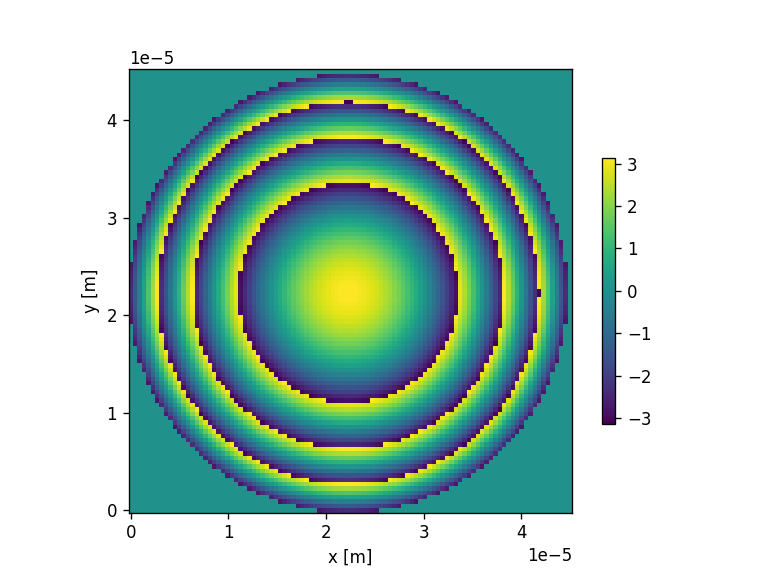

<class 'pyMOE.aperture.Aperture'>
[Create Polygons]
Elapsed: 0:00:00.128438
[Merging polygons]
Elapsed: 0:00:00.049284
[Total time converting to GDS]
Elapsed: 0:00:00.178219
Saving file to fresnel_phase_mask.gds
Saved fresnel_phase_mask.gds
[Saving GDS file]
Elapsed: 0:00:00.008961
[6]:
###transform the phase map into [0, 2*pi]
#Attention, fresarray_rad is the 2D phase map WITHOUT being layered -> exact phase value
fresarray_rad = mask.aperture
mask.aperture = fresarray_rad - np.min(fresarray_rad)

fphas =  moe.generate.truncate_aperture_radius(mask, radius = xsiz/2*micro, center=center)

#transform the phase map into a map of the pillar diameters
dvars = func(fphas.aperture)
[7]:
###Let's represent the map of the diameter of the cylinders
#clip the matrix of values within a range
dvarx = np.clip(dvars,0,np.max(dvar_cut) )-np.min(dvars)

#create the vectors for xsiz and ysiz, with npix
xc1 = np.linspace(0, xsiz, npix)
yc1 = np.linspace(0, ysiz, npix)
(xc, yc) = np.meshgrid(xc1,yc1)

plt.figure()
plt.axis('equal')
plt.pcolormesh(xc,yc,dvarx, cmap=plt.get_cmap("Greys"))
plt.xlabel('x ($\mu$m)')
plt.ylabel('y ($\mu$m)')
plt.colorbar(label='Pillar diameters ($\mu$m)')
plt.tight_layout()

[8]:
###Transform the phase profile into a metasurface mask
import pyMOE.metas  as metas

p = 0.445 #periodicity between pillars in um
pixelx = p
pixely = p
aperture_vals = mask.aperture
diam_mat = np.unique(dvarx)
topcellname = "TOP" #name of the gds cell
outfile = "fresnel_metasurface_pillars.gds"

moe.metas.metasurface_from_phase(xsiz, ysiz, pixelx, pixely, p, aperture_vals, topcellname, outfile, scaling= diam_mat, \
                       gdspyelements='pillar', verbose=False, grid='square')
Pillar metasurface
Building the metasurface...
Total of 8 layers.
Building meta-elements in layer 0:
Elapsed: 0:00:00
Building meta-elements in layer 1:
Progress: [####################] 100.0%
Elapsed: 0:00:00.113003
Building meta-elements in layer 2:
Progress: [####################] 100.0%
Elapsed: 0:00:00.080148
Building meta-elements in layer 3:
Progress: [####################] 100.0%
Elapsed: 0:00:00.101058
Building meta-elements in layer 4:
Progress: [####################] 100.0%
Elapsed: 0:00:00.086620
Building meta-elements in layer 5:
Progress: [####################] 100.0%
Elapsed: 0:00:00.088613
Building meta-elements in layer 6:
Progress: [####################] 100.0%
Elapsed: 0:00:00.100559
Building meta-elements in layer 7:
Progress: [####################] 100.0%
Elapsed: 0:00:00.099065
Elapsed: 0:00:00.673543

 Saved the metasurface mask with 6966 meta-elements in the file fresnel_metasurface_pillars.gds
Selection of diameters + phases
The previous example considers all the values of the 2D phase map. However, due to the extrapolation within the interpolation function there might be some outlier values for the diameters of the pillars.
For this we can select a limited number of points and re-design the metasurface with this selection.
[9]:
#Attention, fresarray_rad is the 2D phase map WITHOUT being layered -> exact phase value
fphas = mask.aperture +0

#bins array, with n divisions, for the selection of points
#can be used in conjunction with the generate mask with exact selection of phase contours  - see Generate_masks.ipynb
binarray = np.linspace(0,2*np.pi,n+1)

#digitize the phase into the bins that we want
#attention that the digitize function gives the INDEX of the value in the binarray
newphas = np.digitize(fphas, bins = binarray, right=True)

#initialize the  2D array of diameters
diam_mat= fphas

#To get the correspondent phase and also the diameter we do
for i, iv in enumerate(newphas):
    for j, jv in enumerate(newphas[i,:]):
        #get the phase corresponding to the digitization
        dphas = binarray[newphas[i,j] ]
        #get the diameter from the interpolation function
        #we clip to avoid the extrapolation at borders
        diam_mat[i,j] = np.clip(func(dphas ) , 0, p)

#check how many levels we actually have
#check how many levels we actually have
print(np.shape(np.unique(diam_mat))[0])
8
[10]:
#Let's check the selection of phase and diameters
diamsel = np.unique(diam_mat)
phasesel = binarray[np.unique(newphas) ]

#print(diamsel.shape)
#print(phasesel.shape)

fig = plt.figure()
plt.plot(dvar_cut, phas_cut)
plt.scatter(diamsel, phasesel, color='red')
plt.xlabel('diameter ($\mu$m)')
plt.ylabel('phase (rad)')
[10]:
Text(0, 0.5, 'phase (rad)')

[11]:
###Let's inspect the map of the diameter of the cylinders

#clip the matrix of values within a range
#dvarx = np.clip(diam_mat,0,p*0.9 )

#when clipping, we might be cutting some levels (so, the actual nr of levels is)
print("The number of levels after printing is " +str(len(np.unique(dvarx))) + ".")


#create the vectors for xsiz and ysiz, with npix
xc1 = np.linspace(0, xsiz, npix)
yc1 = np.linspace(0, ysiz, npix)
(xc, yc) = np.meshgrid(xc1,yc1)

plt.figure()
plt.axis('equal')
plt.pcolormesh(xc,yc,dvarx, cmap=plt.get_cmap("Greys"))
plt.xlabel('x ($\mu$m)')
plt.ylabel('y ($\mu$m)')
plt.colorbar(label='Pillar diameters ($\mu$m)')
plt.tight_layout()
The number of levels after printing is 8.

[12]:
###Transform the square grid phase profile into a metasurface mask using instatiation of self-define pillar element

p = 0.445 #periodicity between pillars in um
pixelx = p
pixely = p
topcellname = "TOP" #name of the gds cell
outfilen  = "fresnel_metasurface_pillars_instance.gds"
aperture_vals = mask.aperture
diam_mat = np.unique(dvarx)

moe.metas.metasurface_from_phase_instances (xsiz, ysiz, pixelx, pixely, p, aperture_vals, topcellname, outfilen, \
                                      infile=None, verbose=False, rotation=None, scaling=diam_mat, grid='square',\
                                      mindim = 0.05, smallerdim =0, tempfile="temp.gds")
Pillar metasurface
Building the metasurface...
Total of 8 layers.
Building meta-elements in layer 0:
Elapsed: 0:00:00
Progress: [####################] 100.0%
So far 0 elements and counting.
Building meta-elements in layer 1:
Elapsed: 0:00:00.025711
Progress: [####################] 100.0%
So far 1004 elements and counting.
Building meta-elements in layer 2:
Elapsed: 0:00:00.042316
Progress: [####################] 100.0%
So far 1964 elements and counting.
Building meta-elements in layer 3:
Elapsed: 0:00:00.036341
Progress: [####################] 100.0%
So far 2952 elements and counting.
Building meta-elements in layer 4:
Elapsed: 0:00:00.037833
Progress: [####################] 100.0%
So far 3988 elements and counting.
Building meta-elements in layer 5:
Elapsed: 0:00:00.028377
Progress: [####################] 100.0%
So far 4962 elements and counting.
Building meta-elements in layer 6:
Elapsed: 0:00:00.035843
Progress: [####################] 100.0%
So far 5968 elements and counting.
Building meta-elements in layer 7:
Elapsed: 0:00:00.049283
Progress: [####################] 100.0%
So far 6966 elements and counting.
Elapsed: 0:00:00.259858

 Saved the metasurface mask with 6966 meta-elements in the file fresnel_metasurface_pillars_instance.gds
[13]:
###Transform the phase profile into a metasurface mask using instatiation with input meta-element file "circle.gds"

p = 0.445 #periodicity between pillars in um
pixelx = p
pixely = p
topcellname = "TOP" #name of the gds cell
outfilen  = "fresnel_metasurface_pillars_instance_circle.gds"
aperture_vals = mask.aperture
diam_mat = np.unique(dvarx)

moe.metas.metasurface_from_phase_instances (xsiz, ysiz, pixelx, pixely, p, aperture_vals, topcellname, outfilen, infile="circle.gds",\
                                  verbose=False, rotation=None, scaling=diam_mat, grid='square',\
                                  mindim = 0.05, smallerdim =0, tempfile="tempcircle.gds")
Building the metasurface...
Total of 8 layers.
Building meta-elements in layer 0:
Elapsed: 0:00:00
Progress: [####################] 100.0%
So far 0 elements and counting.
Building meta-elements in layer 1:
Rotated circle.gds by 0.0 degrees. Saved in tempcircle.gds
Elapsed: 0:00:00.025886
Progress: [####################] 100.0%
So far 1004 elements and counting.
Building meta-elements in layer 2:
Rotated circle.gds by 0.0 degrees. Saved in tempcircle.gds
Elapsed: 0:00:00.029369
Progress: [####################] 100.0%
So far 1964 elements and counting.
Building meta-elements in layer 3:
Rotated circle.gds by 0.0 degrees. Saved in tempcircle.gds
Elapsed: 0:00:00.031365
Progress: [####################] 100.0%
So far 2952 elements and counting.
Building meta-elements in layer 4:
Rotated circle.gds by 0.0 degrees. Saved in tempcircle.gds
Elapsed: 0:00:00.032852
Progress: [####################] 100.0%
So far 3988 elements and counting.
Building meta-elements in layer 5:
Rotated circle.gds by 0.0 degrees. Saved in tempcircle.gds
Elapsed: 0:00:00.061235
Progress: [####################] 100.0%
So far 4962 elements and counting.
Building meta-elements in layer 6:
Rotated circle.gds by 0.0 degrees. Saved in tempcircle.gds
Elapsed: 0:00:00.063720
Progress: [####################] 100.0%
So far 5968 elements and counting.
Building meta-elements in layer 7:
Rotated circle.gds by 0.0 degrees. Saved in tempcircle.gds
Elapsed: 0:00:00.058244
Progress: [####################] 100.0%
So far 6966 elements and counting.
Elapsed: 0:00:00.308150

 Saved the metasurface mask with 6966 meta-elements in the file fresnel_metasurface_pillars_instance_circle.gds
[14]:
### Example with a spiral complex phase function

p = 5 #periodicity between pillars in um
pixelx = p
pixely = p


#attention, make sure to have enough pixels
#npix = 5000  # number of pixels
xsiz = 250 #x-size
ysiz = 250 #y-size
ltop = 1 #topological number

npix = int(np.round(xsiz/p))

#spiral mask is defined as
#spiral(x,y,x0,y0,ltop)

def spiral(x,y,x0,y0,L):
    """
    returns a spiral COMPLEX PHASE with input meshgrid (x,y) with center at (x0,y0)
    x = x array from meshgrid
    y = y array from meshgrid
    x0 = x-coordinate of center of the lens
    y0 = y-coordinate of center of the lens
    L = topological charge
    """

    theta = np.arctan2((y-y0),(x-x0))
    sp = np.exp(1.0j*L*theta)
    return sp

n =8 # number of gray levels

center = (0, 0)

aperture = moe.generate.create_empty_aperture(-xsiz/2*micro, xsiz/2*micro, npix, -ysiz/2*micro, ysiz/2*micro, npix,)
mask =  moe.generate.arbitrary_aperture_function(aperture, moe.sag.spiral, center=center, L=ltop)
moe.plotting.plot_aperture(mask)

mask.discretize(n)
moe.plotting.plot_aperture(mask)

fresarray_rad = mask.aperture
fresarray_rad.shape
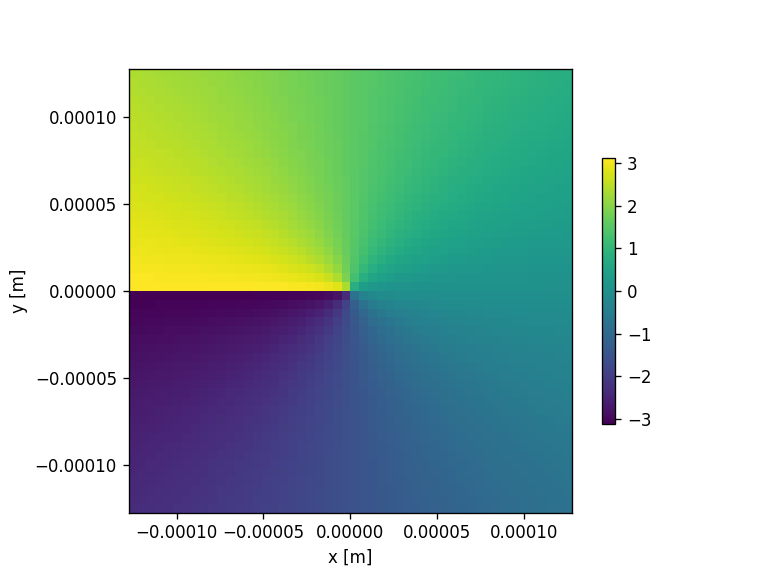

[14]:
(50, 50)
[15]:
###Assuming a linear correspondence between the phase and the rotation angle of each meta element
## Here we define a meta element rotated by the corresponding phase angle
## Here, e.g. rotation array is defined as an array between 0 and 2*pi, but any rotation array can be in principle applied

topcellname = "TOP" #name of the gds cell
outfile  = "fresnel_metasurface_rect_rotations.gds"
aperture_vals = fresarray_rad
rect = gdspy.Rectangle((-0.5, -2), (0.5, 2))
rotation_array = np.arange(0, 2*np.pi, 2*np.pi/len(np.unique(aperture_vals)))

moe.metas.metasurface_from_phase(xsiz, ysiz, pixelx, pixely, p, aperture_vals, topcellname, outfile, rotation=rotation_array,\
                       scaling= None, gdspyelements=rect, verbose=False, grid='square')

###And with instances
outfile2  = "fresnel_metasurface_rect_rotations_instances.gds"
moe.metas.metasurface_from_phase_instances(xsiz, ysiz, pixelx, pixely, p, aperture_vals, topcellname, outfile2, gdspyelements=rect, \
                                 infile=None, verbose=False, rotation=rotation_array, scaling=None, grid='square',\
                                 tempfile="tem_inst.gds")


##HEre we also check the hexagonal grid, for rotation purposes only
#-> attention, the function is not being recalculated at the hexagonal grid points, but for precise calculation T SHOULD!!
topcellname = "TOP" #name of the gds cell
outfile  = "fresnel_metasurface_rect_rotations_hexagonal.gds"
aperture_vals = fresarray_rad
rect = gdspy.Rectangle((-0.5, -2), (0.5, 2))
rotation_array = np.arange(0, 2*np.pi, 2*np.pi/len(np.unique(aperture_vals)))

moe.metas.metasurface_from_phase(xsiz, ysiz, pixelx, pixely, p, aperture_vals, topcellname, outfile, rotation=rotation_array,\
                       scaling= None, gdspyelements=rect, verbose=False, grid='hex')

###And with instances
outfile2  = "fresnel_metasurface_rect_rotations_hexagonal_instances.gds"
moe.metas.metasurface_from_phase_instances(xsiz, ysiz, pixelx, pixely, p, aperture_vals, topcellname, outfile2, gdspyelements=rect, \
                                 infile=None, verbose=False, rotation=rotation_array, scaling=None, grid='hex',\
                                 tempfile="tem_inst.gds")
Custom metasurface
Single gdspyelement element
Building the metasurface...
Total of 8 layers.
Building meta-elements in layer 0:
Progress: [####################] 100.0%
Elapsed: 0:00:00.029372
Building meta-elements in layer 1:
Progress: [####################] 100.0%
Elapsed: 0:00:00.038829
Building meta-elements in layer 2:
Progress: [####################] 100.0%
Elapsed: 0:00:00.026881
Building meta-elements in layer 3:
Progress: [####################] 100.0%
Elapsed: 0:00:00.029368
Building meta-elements in layer 4:
Progress: [####################] 100.0%
Elapsed: 0:00:00.025391
Building meta-elements in layer 5:
Progress: [####################] 100.0%
Elapsed: 0:00:00.027878
Building meta-elements in layer 6:
Progress: [####################] 100.0%
Elapsed: 0:00:00.040321
Building meta-elements in layer 7:
Progress: [####################] 100.0%
Elapsed: 0:00:00.029871
Elapsed: 0:00:00.251395

 Saved the metasurface mask with 2500 meta-elements in the file fresnel_metasurface_rect_rotations.gds
Custom metasurface
Single gdspyelement element
Building the metasurface...
Total of 8 layers.
Building meta-elements in layer 0:
Elapsed: 0:00:00.009957
Progress: [####################] 100.0%
So far 325 elements and counting.
Building meta-elements in layer 1:
Elapsed: 0:00:00.012444
Progress: [####################] 100.0%
So far 625 elements and counting.
Building meta-elements in layer 2:
Elapsed: 0:00:00.014436
Progress: [####################] 100.0%
So far 950 elements and counting.
Building meta-elements in layer 3:
Elapsed: 0:00:00.018421
Progress: [####################] 100.0%
So far 1250 elements and counting.
Building meta-elements in layer 4:
Elapsed: 0:00:00.022400
Progress: [####################] 100.0%
So far 1550 elements and counting.
Building meta-elements in layer 5:
Elapsed: 0:00:00.027380
Progress: [####################] 100.0%
So far 1875 elements and counting.
Building meta-elements in layer 6:
Elapsed: 0:00:00.027380
Progress: [####################] 100.0%
So far 2175 elements and counting.
Building meta-elements in layer 7:
Elapsed: 0:00:00.028375
Progress: [####################] 100.0%
So far 2500 elements and counting.
Elapsed: 0:00:00.164281

 Saved the metasurface mask with 2500 meta-elements in the file fresnel_metasurface_rect_rotations_instances.gds
Custom metasurface
Single gdspyelement element
Building the metasurface...
Total of 8 layers.
Building meta-elements in layer 0:
Progress: [####################] 100.0%
Elapsed: 0:00:00.066704
Building meta-elements in layer 1:
Progress: [####################] 100.0%
Elapsed: 0:00:00.024891
Building meta-elements in layer 2:
Progress: [####################] 100.0%
Elapsed: 0:00:00.026883
Building meta-elements in layer 3:
Progress: [####################] 100.0%
Elapsed: 0:00:00.024395
Building meta-elements in layer 4:
Progress: [####################] 100.0%
Elapsed: 0:00:00.024392
Building meta-elements in layer 5:
Progress: [####################] 100.0%
Elapsed: 0:00:00.025886
Building meta-elements in layer 6:
Progress: [####################] 100.0%
Elapsed: 0:00:00.038835
Building meta-elements in layer 7:
Progress: [####################] 100.0%
Elapsed: 0:00:00.027869
Elapsed: 0:00:00.264338

 Saved the metasurface mask with 2500 meta-elements in the file fresnel_metasurface_rect_rotations_hexagonal.gds
Custom metasurface
Single gdspyelement element
Building the metasurface...
Total of 8 layers.
Building meta-elements in layer 0:
Elapsed: 0:00:00.028375
Progress: [####################] 100.0%
So far 325 elements and counting.
Building meta-elements in layer 1:
Elapsed: 0:00:00.022402
Progress: [####################] 100.0%
So far 625 elements and counting.
Building meta-elements in layer 2:
Elapsed: 0:00:00.012943
Progress: [####################] 100.0%
So far 950 elements and counting.
Building meta-elements in layer 3:
Elapsed: 0:00:00.020908
Progress: [####################] 100.0%
So far 1250 elements and counting.
Building meta-elements in layer 4:
Elapsed: 0:00:00.015432
Progress: [####################] 100.0%
So far 1550 elements and counting.
Building meta-elements in layer 5:
Elapsed: 0:00:00.014934
Progress: [####################] 100.0%
So far 1875 elements and counting.
Building meta-elements in layer 6:
Elapsed: 0:00:00.026882
Progress: [####################] 100.0%
So far 2175 elements and counting.
Building meta-elements in layer 7:
Elapsed: 0:00:00.023397
Progress: [####################] 100.0%
So far 2500 elements and counting.
Elapsed: 0:00:00.169755

 Saved the metasurface mask with 2500 meta-elements in the file fresnel_metasurface_rect_rotations_hexagonal_instances.gds
[16]:
#reconstructing spiral metasurface as in Yu et al. 2011 paper https://www.science.org/doi/10.1126/science.1210713

#construction of meta-element arrays
def yu_capasso_library_element(cellname, width, length, delta, angle,  nind = None ,save=False ):
    """
    Create Yu et al. meta-element library
    https://www.science.org/doi/10.1126/science.1210713

    values from publication 2011:
    width = 0.22 #um
    lengtharray = np.array([0.7, 0.9, 1.1, 1.35])  #um
    deltas = np.array([180, 60, 90, 120 ]) #degs
    angles = np.array([-45, 225]) #degs

    """
    lib = gdspy.GdsLibrary()
    gdspy.current_library = gdspy.GdsLibrary()

    cell = lib.new_cell(cellname)

    rect1 = gdspy.Rectangle((-width/2, 0), (width/2, length))

    rect2 = gdspy.Rectangle((-width/2, 0), (width/2, length))
    rect2 = rect2.rotate(np.radians(delta))
    element = gdspy.boolean(rect1, rect2, "or")

    #condition to be improved...
    if delta==180 or delta==175:
        element = element.rotate(np.radians(angle))

    else:
        element = element.rotate(np.radians(angle))
        element = element.rotate(np.radians(-delta/2))

    if save:
        cell.add(element)
        name = "element_w"+str(width)+"_l"+str(length)+"_r"+str(angle)+".gds"
        if nind is not None:
            name = str(nind)+"element_w"+str(width)+"_l"+str(length)+"_r"+str(angle)+".gds"
        lib.write_gds(name)

    return element

cellname = "TOP"

p = 5 #periodicity between elements
pixelx = p
pixely = p

#attention, make sure to have enough pixels
#npix = 5000  # number of pixels
xsiz = 250 #x-size
ysiz = 250 #y-size
ltop = 1 #topological number

npix = int(np.round(xsiz/p))

n =8 # number of gray levels

center = (0, 0)

aperture = moe.generate.create_empty_aperture(-xsiz/2*micro, xsiz/2*micro, npix, -ysiz/2*micro, ysiz/2*micro, npix,)
mask =  moe.generate.arbitrary_aperture_function(aperture, moe.sag.spiral, center=center, L=ltop)
moe.plotting.plot_aperture(mask)

mask.aperture = mask.aperture +np.pi


mask.discretize(n)
moe.plotting.plot_aperture(mask)

fresarray_rad = mask.aperture

#########################################################################
###make attribution between the phase and element in the yu et al. library

width = 0.22 #um
lengtharray = np.array([0.7, 0.9, 1.1, 1.35])  #um
deltas = np.array([180, 60, 90, 120 ]) #degs
angles = np.array([-45, 225]) #degs
elements= []

for angle in angles:
    for il, delta in enumerate(deltas):
        elements = np.append(yu_capasso_library_element(cellname, width, lengtharray[il], delta, angle, save=True), elements)


##organize the meta-elements to match the reported phases in fig 5
elements = np.flip(elements)
gdspyelementarray = [elements[6], elements[7], elements[0], elements[1], elements[2], elements[3], elements[4], elements[5]]

#Build the metasurface
topcellname = "TOP" #name of the gds cell
outfile  = "spiral_metasurface_yu_capasso.gds"
aperture_vals = fresarray_rad
rotation_array = None


moe.metas.metasurface_from_phase(xsiz, ysiz, pixelx, pixely, p, aperture_vals, topcellname, outfile, rotation=rotation_array,\
                       scaling= None, gdspyelements=gdspyelementarray, verbose=False, grid='square')

###And with instances
outfile2  = "spiral_metasurface_yu_capasso_instances.gds"
moe.metas.metasurface_from_phase_instances(xsiz, ysiz, pixelx, pixely, p, aperture_vals, topcellname, outfile2,  gdspyelements=gdspyelementarray, \
                                 infile=None, verbose=False, rotation=rotation_array, scaling=None, grid='square',\
                                 tempfile="tem_inst.gds")


Custom metasurface
Building the metasurface...
Total of 8 layers.
Building meta-elements in layer 0:
Progress: [####################] 100.0%
Elapsed: 0:00:00.058743
Building meta-elements in layer 1:
Progress: [####################] 100.0%
Elapsed: 0:00:00.025388
Building meta-elements in layer 2:
Progress: [####################] 100.0%
Elapsed: 0:00:00.026881
Building meta-elements in layer 3:
Progress: [####################] 100.0%
Elapsed: 0:00:00.025389
Building meta-elements in layer 4:
Progress: [####################] 100.0%
Elapsed: 0:00:00.037831
Building meta-elements in layer 5:
Progress: [####################] 100.0%
Elapsed: 0:00:00.030370
Building meta-elements in layer 6:
Progress: [####################] 100.0%
Elapsed: 0:00:00.053764
Building meta-elements in layer 7:
Progress: [####################] 100.0%
Elapsed: 0:00:00.031362
Elapsed: 0:00:00.292219

 Saved the metasurface mask with 2500 meta-elements in the file spiral_metasurface_yu_capasso.gds
Custom metasurface
Building the metasurface...
Total of 8 layers.
Building meta-elements in layer 0:
Elapsed: 0:00:00.017420
Progress: [####################] 100.0%
So far 325 elements and counting.
Building meta-elements in layer 1:
Elapsed: 0:00:00.018419
Progress: [####################] 100.0%
So far 625 elements and counting.
Building meta-elements in layer 2:
Elapsed: 0:00:00.017923
Progress: [####################] 100.0%
So far 950 elements and counting.
Building meta-elements in layer 3:
Elapsed: 0:00:00.021906
Progress: [####################] 100.0%
So far 1250 elements and counting.
Building meta-elements in layer 4:
Elapsed: 0:00:00.022404
Progress: [####################] 100.0%
So far 1550 elements and counting.
Building meta-elements in layer 5:
Elapsed: 0:00:00.022402
Progress: [####################] 100.0%
So far 1875 elements and counting.
Building meta-elements in layer 6:
Elapsed: 0:00:00.026384
Progress: [####################] 100.0%
So far 2175 elements and counting.
Building meta-elements in layer 7:
Elapsed: 0:00:00.027380
Progress: [####################] 100.0%
So far 2500 elements and counting.
Elapsed: 0:00:00.178217

 Saved the metasurface mask with 2500 meta-elements in the file spiral_metasurface_yu_capasso_instances.gds
[17]:
##reconstructing metalens in paper https://doi.org/10.1126/sciadv.abn5644
###First with a square grid

foc = 120 # focal distance in um
lda = 0.197 #wavelength in um
xsiz = 45 #um
ysiz = 45 #um
p=0.27
pixelx = p
pixely = p
n = 8  # number of gray levels
gdsname = 'fresnel_phase_mask_triangles.gds' # name of gds file

#calculation for the number of pixels using the size in x and the periodicity
npix = int(np.round(xsiz/p))

#obtain the phase profile of a fresnel phase mask
#fresarray_rad= moe.gen.fresnel_phase_mask(npix, foc, lda, xsiz, ysiz, n, filename=gdsname, plotting=True)

# Create empty mask
aperture = moe.generate.create_empty_aperture(0, xsiz*micro, npix, 0, ysiz*micro, npix,)

center = (xsiz*micro/2-pixelx*micro/2, ysiz*micro/2-pixely*micro/2)

# and truncate around radius
mask = moe.generate.fresnel_phase(aperture, foc * micro, lda * micro, radius=xsiz/2*micro, center = center)
moe.plotting.plot_aperture(mask, )

mask.discretize(n)
moe.plotting.plot_aperture(mask,)


gdsmask = moe.GDSMask(mask, verbose=False)

# Create layout and merge polygons together
gdsmask.create_layout(mode = "raster", merge=True) # or mode ="contour"
gdsmask.write_gds(gdsname)

fresarray_rad = mask.aperture
fresarray_rad.shape
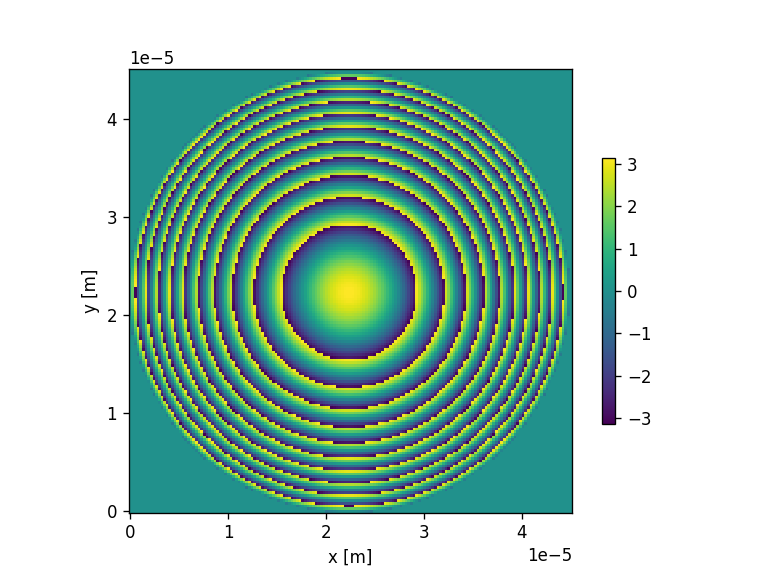

<class 'pyMOE.aperture.Aperture'>
[Create Polygons]
Elapsed: 0:00:00.387302
[Merging polygons]
Elapsed: 0:00:00.141377
[Total time converting to GDS]
Elapsed: 0:00:00.528679
Saving file to fresnel_phase_mask_triangles.gds
Saved fresnel_phase_mask_triangles.gds
[Saving GDS file]
Elapsed: 0:00:00.039326
[17]:
(167, 167)
[18]:
##Square grid is being used

aperture_vals = mask.aperture
rotation_array = np.unique(fresarray_rad)

topcellname = "TOP" #name of the gds cell
outfilen  = "fresnel_metasurface_pillars_instance_rotation_triangle.gds"


moe.metas.metasurface_from_phase_instances (xsiz, ysiz, pixelx, pixely, p, aperture_vals, topcellname, outfilen, infile="triangle.gds",\
                                  verbose=False, rotation=rotation_array, scaling=None, grid='square',\
                                      mindim = 0.05, smallerdim =0, tempfile="temptriangle.gds")
Building the metasurface...
Total of 8 layers.
Building meta-elements in layer 0:
Rotated triangle.gds by -179.993630183959 degrees. Saved in temptriangle.gds
Elapsed: 0:00:00.056255
Progress: [####################] 100.0%
So far 2520 elements and counting.
Building meta-elements in layer 1:
Rotated triangle.gds by -134.9977723597226 degrees. Saved in temptriangle.gds
Elapsed: 0:00:00.052271
Progress: [####################] 100.0%
So far 5046 elements and counting.
Building meta-elements in layer 2:
Rotated triangle.gds by -90.00191453548621 degrees. Saved in temptriangle.gds
Elapsed: 0:00:00.070689
Progress: [####################] 100.0%
So far 7638 elements and counting.
Building meta-elements in layer 3:
Rotated triangle.gds by -45.00605671124981 degrees. Saved in temptriangle.gds
Elapsed: 0:00:00.057247
Progress: [####################] 100.0%
So far 10410 elements and counting.
Building meta-elements in layer 4:
Rotated triangle.gds by -0.010198887013413165 degrees. Saved in temptriangle.gds
Elapsed: 0:00:00.134909
Progress: [####################] 100.0%
So far 19451 elements and counting.
Building meta-elements in layer 5:
Rotated triangle.gds by 44.985658937222986 degrees. Saved in temptriangle.gds
Elapsed: 0:00:00.085127
Progress: [####################] 100.0%
So far 22325 elements and counting.
Building meta-elements in layer 6:
Rotated triangle.gds by 89.98151676145939 degrees. Saved in temptriangle.gds
Elapsed: 0:00:00.103048
Progress: [####################] 100.0%
So far 25052 elements and counting.
Building meta-elements in layer 7:
Rotated triangle.gds by 134.9773745856958 degrees. Saved in temptriangle.gds
Elapsed: 0:00:00.100559
Progress: [####################] 100.0%
So far 27889 elements and counting.
Elapsed: 0:00:00.668072

 Saved the metasurface mask with 27889 meta-elements in the file fresnel_metasurface_pillars_instance_rotation_triangle.gds
Hexagonal grid metasurface
[19]:
###Make a fresnel metasurface with hexagonal meshgrid
foc = 100 # focal distance in um
lda = 0.6328 #wavelength in um
xsiz = 45 #um
ysiz = 45 #um
n = 8  # number of gray levels
gdsname = 'fresnel_phase_mask_hexagonal.gds' # name of gds file
p=0.445
pixelx = p
pixely =  p* np.cos(np.radians(30))

#calculation for the number of pixels using the size in x and the periodicity
npix_x = int(np.round(xsiz/pixelx))
npix_y = int(np.round(ysiz/pixely))

npix = npix_x * npix_y

# Create empty mask
aperture_hex = moe.generate.create_empty_aperture(0, xsiz*micro, npix_x, 0, ysiz*micro, npix_y,)

center = (xsiz*micro/2-pixelx*micro/2, ysiz*micro/2-pixely*micro/2)

# and truncate around radius
mask = moe.generate.fresnel_phase(aperture_hex, foc * micro, lda * micro, center = center)
moe.plotting.plot_aperture(mask, )

mask.discretize(n)
moe.plotting.plot_aperture(mask)

gdsmask = moe.GDSMask(mask, verbose=False)

# Create layout and merge polygons together
gdsmask.create_layout(mode = "raster", merge=True) # or mode ="contour"
gdsmask.write_gds(gdsname)

fresarray_rad = mask.aperture

###Create the hexagonal grid
xv1, yv1 = np.meshgrid(np.arange(0, xsiz*micro, pixelx*micro), np.arange(0, ysiz*micro, pixely*micro))
xv1[::2, :] += pixelx*micro/2
xv = xv1 - center[0]
yv = yv1 - center[1]

#Calculate the fresnel phase at the hexagonal meshgrid points
fres_hex = moe.sag_functions.fresnel_lens_phase(xv,yv,foc*micro, lda*micro)

###transform the phase map into [0, 2*pi]
#Attention, fresarray_rad is the 2D phase map WITHOUT being layered -> exact phase value
fphas_hex = fres_hex

print(fres_hex.shape)

plt.figure()
plt.axis('equal')
plt.pcolormesh(xv,yv,fres_hex, cmap=plt.get_cmap("Greys"))
plt.xlabel('x ($\mu$m)')
plt.ylabel('y ($\mu$m)')
plt.colorbar(label='Phase (rad)')
plt.tight_layout()

#bins array, with n divisions, for the selection of points
#can be used in conjunction with the generate mask with exact selection of phase contours  - see Generate_masks.ipynb
binarray = np.linspace(0,2*np.pi,n+1)

#digitize the phase into the bins that we want
#attention that the digitize function gives the INDEX of the value in the binarray

newphas = np.digitize(fphas_hex-np.min(fphas_hex), bins = binarray, right=True)

#initialize the  2D array of diameters
diam_mat= fphas_hex

#To get the correspondent phase and also the diameter we do
for i, iv in enumerate(newphas):
    for j, jv in enumerate(newphas[i,:]):
        #get the phase corresponding to the digitization
        dphas = binarray[newphas[i,j] ]
        #get the diameter from the interpolation function
        #we clip to avoid the extrapolation at borders
        diam_mat[i,j] = np.clip(func(dphas), 0, p) #np.clip(func(dphas ) , 0, p)

###truncate around radius (introduces one more layer)
diam_mat[np.where(xv**2+yv**2>(xsiz*micro/2)**2)] = 0

#check how many levels we actually have
print(np.shape(np.unique(diam_mat))[0]-1)

dvarx_hex = diam_mat

plt.figure()
plt.axis('equal')
plt.pcolormesh(xv,yv,dvarx_hex, cmap=plt.get_cmap("Greys"))
plt.xlabel('x ($\mu$m)')
plt.ylabel('y ($\mu$m)')
plt.colorbar(label='Pillar diameters ($\mu$m)')
plt.tight_layout()


<class 'pyMOE.aperture.Aperture'>
[Create Polygons]
Elapsed: 0:00:00.196139
[Merging polygons]
Elapsed: 0:00:00.079650
[Total time converting to GDS]
Elapsed: 0:00:00.275789
Saving file to fresnel_phase_mask_hexagonal.gds
Saved fresnel_phase_mask_hexagonal.gds
[Saving GDS file]
Elapsed: 0:00:00.010951
(117, 102)
C:\Users\jcunha377\AppData\Local\Temp\4\ipykernel_32820\765843294.py:55: UserWarning: The input coordinates to pcolormesh are interpreted as cell centers, but are not monotonically increasing or decreasing. This may lead to incorrectly calculated cell edges, in which case, please supply explicit cell edges to pcolormesh.
  plt.pcolormesh(xv,yv,fres_hex, cmap=plt.get_cmap("Greys"))
8
C:\Users\jcunha377\AppData\Local\Temp\4\ipykernel_32820\765843294.py:92: UserWarning: The input coordinates to pcolormesh are interpreted as cell centers, but are not monotonically increasing or decreasing. This may lead to incorrectly calculated cell edges, in which case, please supply explicit cell edges to pcolormesh.
  plt.pcolormesh(xv,yv,dvarx_hex, cmap=plt.get_cmap("Greys"))


[20]:
###Transform the phase profile calculated in the square grid into a metasurface with square grid mask using instances
topcellname = "TOP" #name of the gds cell
outfile = "fresnel_metasurface_pillars_hexagonal.gds"

aperture_vals = fphas_hex
diam_mat = np.unique(dvarx_hex)

moe.metas.metasurface_from_phase(xsiz, ysiz, pixelx, pixely, p, aperture_vals, topcellname, outfile, scaling= diam_mat, \
                       gdspyelements='pillar', verbose=False, grid='hex', mindim=0.2)
Pillar metasurface
Building the metasurface...
Total of 9 layers.
Building meta-elements in layer 0:
Elapsed: 0:00:00
Building meta-elements in layer 1:
Progress: [####################] 100.0%
Elapsed: 0:00:00.105536
Building meta-elements in layer 2:
Progress: [####################] 100.0%
Elapsed: 0:00:00.108524
Building meta-elements in layer 3:
Progress: [####################] 100.0%
Elapsed: 0:00:00.118975
Building meta-elements in layer 4:
Progress: [####################] 100.0%
Elapsed: 0:00:00.124952
Building meta-elements in layer 5:
Progress: [####################] 100.0%
Elapsed: 0:00:00.098070
Building meta-elements in layer 6:
Progress: [####################] 100.0%
Elapsed: 0:00:00.096578
Building meta-elements in layer 7:
Progress: [####################] 100.0%
Elapsed: 0:00:00.114000
Building meta-elements in layer 8:
Progress: [####################] 100.0%
Elapsed: 0:00:00.114995
Elapsed: 0:00:00.886611

 Saved the metasurface mask with 9270 meta-elements in the file fresnel_metasurface_pillars_hexagonal.gds
[21]:
###Transform the phase profile calculated in the hexagonal grid into a metasurface with hexagonal grid mask using instances
topcellname = "TOP" #name of the gds cell
outfilen = "fresnel_metasurface_pillars_hexagonal_instances.gds"

aperture_vals = fphas_hex
diam_mat = np.unique(dvarx_hex)
print(diam_mat)

moe.metas.metasurface_from_phase_instances (xsiz, ysiz, pixelx, pixely, p, aperture_vals, topcellname, outfilen, gdspyelements='pillar',\
                                  infile=None, verbose=False, rotation=None, scaling=diam_mat, grid='hex',\
                                      mindim = 0.05, smallerdim =0, tempfile="temp_inst.gds")
[0.         0.15595934 0.19861328 0.23103991 0.26153956 0.29197999
 0.32895951 0.41985771 0.445     ]
Pillar metasurface
Building the metasurface...
Total of 9 layers.
Building meta-elements in layer 0:
Elapsed: 0:00:00
Progress: [####################] 100.0%
So far 0 elements and counting.
Building meta-elements in layer 1:
Elapsed: 0:00:00.035845
Progress: [####################] 100.0%
So far 1051 elements and counting.
Building meta-elements in layer 2:
Elapsed: 0:00:00.029868
Progress: [####################] 100.0%
So far 2229 elements and counting.
Building meta-elements in layer 3:
Elapsed: 0:00:00.033357
Progress: [####################] 100.0%
So far 3417 elements and counting.
Building meta-elements in layer 4:
Elapsed: 0:00:00.028875
Progress: [####################] 100.0%
So far 4581 elements and counting.
Building meta-elements in layer 5:
Elapsed: 0:00:00.042315
Progress: [####################] 100.0%
So far 5756 elements and counting.
Building meta-elements in layer 6:
Elapsed: 0:00:00.034350
Progress: [####################] 100.0%
So far 6920 elements and counting.
Building meta-elements in layer 7:
Elapsed: 0:00:00.043809
Progress: [####################] 100.0%
So far 8094 elements and counting.
Building meta-elements in layer 8:
Elapsed: 0:00:00.063222
Progress: [####################] 100.0%
So far 9270 elements and counting.
Elapsed: 0:00:00.316612

 Saved the metasurface mask with 9270 meta-elements in the file fresnel_metasurface_pillars_hexagonal_instances.gds
[22]:
##reconstructing metalens in paper https://doi.org/10.1126/sciadv.abn5644 with hexagonal grid

foc = 120 # focal distance in um
lda = 0.197 #wavelength in um
xsiz = 45 #um
ysiz = 45 #um
p=0.445
pixelx = p
pixely =  p* np.cos(np.radians(30))

#calculation for the number of pixels using the size in x and the periodicity
npix_x = int(np.round(xsiz/pixelx))
npix_y = int(np.round(ysiz/pixely))

n = 8  # number of gray levels
gdsname = 'fresnel_phase_mask_triangles.gds' # name of gds file

npix = npix_x * npix_y

# Create empty mask
aperture_hex = moe.generate.create_empty_aperture(0, xsiz*micro, npix_x, 0, ysiz*micro, npix_y,)

center = (xsiz*micro/2-pixelx*micro/2, ysiz*micro/2-pixely*micro/2)

# and truncate around radius
mask = moe.generate.fresnel_phase(aperture_hex, foc * micro, lda * micro, center = center)
moe.plotting.plot_aperture(mask, )

mask.discretize(n)
moe.plotting.plot_aperture(mask)

gdsmask = moe.GDSMask(mask, verbose=False)

# Create layout and merge polygons together
gdsmask.create_layout(mode = "raster", merge=True) # or mode ="contour"
gdsmask.write_gds(gdsname)

fresarray_rad = mask.aperture

###Create the hexagonal grid
xv1, yv1 = np.meshgrid(np.arange(0, xsiz*micro, pixelx*micro), np.arange(0, ysiz*micro, pixely*micro))
xv1[::2, :] += pixelx*micro/2
xv = xv1 - center[0]
yv = yv1 - center[1]

#Calculate the fresnel phase at the hexagonal meshgrid points
fres_hex = moe.sag_functions.fresnel_lens_phase(xv,yv,foc*micro, lda*micro)

fres_hex = fres_hex-np.min(fres_hex)

###transform the phase map into [0, 2*pi]
#Attention, fresarray_rad is the 2D phase map WITHOUT being layered -> exact phase value
fphas_hex = fres_hex

print(fres_hex.shape)

plt.figure()
plt.axis('equal')
plt.pcolormesh(xv,yv,fres_hex, cmap=plt.get_cmap("Greys"))
plt.xlabel('x ($\mu$m)')
plt.ylabel('y ($\mu$m)')
plt.colorbar(label='Phase (rad)')
plt.tight_layout()

#bins array, with n divisions, for the selection of points
#can be used in conjunction with the generate mask with exact selection of phase contours  - see Generate_masks.ipynb
binarray = np.linspace(0,2*np.pi,n-1)

#digitize the phase into the bins that we want
#attention that the digitize function gives the INDEX of the value in the binarray
newphas = np.digitize(fphas_hex, bins = binarray, right=True)

diam_mat= fphas_hex

#To get the correspondent phase and also the diameter we do
for i, iv in enumerate(newphas):
    for j, jv in enumerate(newphas[i,:]):
        #get the phase corresponding to the digitization
        dphas = binarray[newphas[i,j] ]
        #get the diameter from the interpolation function
        #we clip to avoid the extrapolation at borders
        diam_mat[i,j] = np.clip(func(dphas), 0, p) #np.clip(func(dphas ) , 0, p)

###truncate around radius
diam_mat[np.where(xv**2+yv**2>(xsiz*micro/2)**2)] = 0

#check how many levels we actually have
print(np.shape(np.unique(diam_mat)))

dvarx_hex = diam_mat

plt.figure()
plt.axis('equal')
plt.pcolormesh(xv,yv,dvarx_hex, cmap=plt.get_cmap("Greys"))
plt.xlabel('x ($\mu$m)')
plt.ylabel('y ($\mu$m)')
plt.colorbar(label='Phase(rad))')
plt.tight_layout()


<class 'pyMOE.aperture.Aperture'>
[Create Polygons]
Elapsed: 0:00:00.335030
[Merging polygons]
Elapsed: 0:00:00.057249
[Total time converting to GDS]
Elapsed: 0:00:00.392776
Saving file to fresnel_phase_mask_triangles.gds
Saved fresnel_phase_mask_triangles.gds
[Saving GDS file]
Elapsed: 0:00:00.020908
(117, 102)
C:\Users\jcunha377\AppData\Local\Temp\4\ipykernel_32820\268812280.py:59: UserWarning: The input coordinates to pcolormesh are interpreted as cell centers, but are not monotonically increasing or decreasing. This may lead to incorrectly calculated cell edges, in which case, please supply explicit cell edges to pcolormesh.
  plt.pcolormesh(xv,yv,fres_hex, cmap=plt.get_cmap("Greys"))
(7,)
C:\Users\jcunha377\AppData\Local\Temp\4\ipykernel_32820\268812280.py:94: UserWarning: The input coordinates to pcolormesh are interpreted as cell centers, but are not monotonically increasing or decreasing. This may lead to incorrectly calculated cell edges, in which case, please supply explicit cell edges to pcolormesh.
  plt.pcolormesh(xv,yv,dvarx_hex, cmap=plt.get_cmap("Greys"))


[23]:
##Hexagonal grid is being used
topcellname = "TOP" #name of the gds cell
p=0.27 ##just from example, it is not the same as in func..
outfilen = "fresnel_metasurface_triangular_hexagonal_instances.gds"
smallerdim =0

aperture_vals2 =fres_hex
rotation_array = np.unique(diam_mat)


moe.metas.metasurface_from_phase_instances(xsiz, ysiz, pixelx, pixely, p, aperture_vals2, topcellname, outfilen, \
                                  infile="triangle.gds",verbose=False, rotation=rotation_array, scaling=None, grid='hex',\
                                  mindim = 0.05, smallerdim =0, tempfile="temptriangle2.gds")
Building the metasurface...
Total of 7 layers.
Building meta-elements in layer 0:
Rotated triangle.gds by 0.0 degrees. Saved in temptriangle2.gds
Elapsed: 0:00:00.036340
Progress: [####################] 100.0%
So far 2664 elements and counting.
Building meta-elements in layer 1:
Rotated triangle.gds by 9.858805355099946 degrees. Saved in temptriangle2.gds
Elapsed: 0:00:00.048286
Progress: [####################] 100.0%
So far 4136 elements and counting.
Building meta-elements in layer 2:
Rotated triangle.gds by 12.655386869933984 degrees. Saved in temptriangle2.gds
Elapsed: 0:00:00.047790
Progress: [####################] 100.0%
So far 5590 elements and counting.
Building meta-elements in layer 3:
Rotated triangle.gds by 14.985112779901062 degrees. Saved in temptriangle2.gds
Elapsed: 0:00:00.049283
Progress: [####################] 100.0%
So far 7139 elements and counting.
Building meta-elements in layer 4:
Rotated triangle.gds by 17.82544625719349 degrees. Saved in temptriangle2.gds
Elapsed: 0:00:00.046299
Progress: [####################] 100.0%
So far 8744 elements and counting.
Building meta-elements in layer 5:
Rotated triangle.gds by 20.518971951990604 degrees. Saved in temptriangle2.gds
Elapsed: 0:00:00.058743
Progress: [####################] 100.0%
So far 10347 elements and counting.
Building meta-elements in layer 6:
Rotated triangle.gds by 25.496621883321634 degrees. Saved in temptriangle2.gds
Elapsed: 0:00:00.050777
Progress: [####################] 100.0%
So far 11934 elements and counting.
Elapsed: 0:00:00.340506

 Saved the metasurface mask with 11934 meta-elements in the file fresnel_metasurface_triangular_hexagonal_instances.gds
Extra: Large metasurface with pre defined library (Yu et al. 2013)
[24]:
###Reconstructing metalens of Yu et al. 2013, square grid

foc = 30000 # focal distance in um
lda = 1.55 #wavelength in um
xsiz = 2*450 #um
ysiz = 2*450 #um
p=0.75
pixelx = p
pixely = p
n = 8  # number of gray levels

#calculation for the number of pixels using the size in x and the periodicity
npix = int(np.round(xsiz/p))

# Create empty mask
aperture = moe.generate.create_empty_aperture(0, xsiz*micro, npix, 0, ysiz*micro, npix,)
center = (xsiz*micro/2, ysiz*micro/2)

# and truncate within radius
mask = moe.generate.fresnel_phase(aperture, foc * micro, lda * micro, radius=xsiz/2*micro, center = center, )
moe.plotting.plot_aperture(mask, )

mask.discretize(n)

max1 = np.max(mask.aperture)


level_increment = np.diff(np.unique(mask.aperture))[0]
level_increment
max_mask = np.max(np.unique(mask.aperture))
trunc_value = max_mask + level_increment

mask2 = moe.generate.truncate_aperture_radius(mask, radius =xsiz/2*micro, center=center, truncate_value=trunc_value)
moe.plotting.plot_aperture(mask2,)

mask2.discretize(n+1)

fig = plt.figure()
plt.imshow(mask2.aperture)

gdsmask = moe.GDSMask(mask, verbose=False)
gdsname = 'fresnel_phase_mask_yu_capasso.gds' # name of gds file
# Create layout and merge polygons together
gdsmask.create_layout(mode = "raster", merge=True) # or mode ="contour"
gdsmask.write_gds(gdsname)


width = 0.05 #um
lengtharray = np.array([0.085,0.18,0.14,0.13])  #um
deltas = np.array([175,  79,68, 104 ]) #degs
angles = np.array([-45, 225]) #degs
elements= []

nindex =0
for angle in angles:
    for il, delta in enumerate(deltas):
        elements = np.append(yu_capasso_library_element(cellname, width, lengtharray[il], delta, angle,  nind=nindex, save=True), elements)

        nindex = nindex + 1


##organize the meta-elements to match the reported phases in fig 16
elements = np.flip(elements)
gdspyelementarray = [elements[4], elements[5], elements[6], elements[7], elements[0], elements[1], elements[2], elements[3] ]


<class 'pyMOE.aperture.Aperture'>
[Create Polygons]
Elapsed: 0:00:17.733168
[Merging polygons]
Elapsed: 0:00:06.360583
[Total time converting to GDS]
Elapsed: 0:00:24.093751
Saving file to fresnel_phase_mask_yu_capasso.gds
Saved fresnel_phase_mask_yu_capasso.gds
[Saving GDS file]
Elapsed: 0:00:00.444049

[25]:
#Build the metasurface
topcellname = "TOP" #name of the gds cell
outfile  = "fresnel_metasurface_yu_capasso.gds"

moe.metas.metasurface_from_phase(xsiz, ysiz, pixelx, pixely, p, mask2.aperture, topcellname, outfile, rotation=None,\
                       scaling= None, gdspyelements=gdspyelementarray, verbose=False, grid='square', largest_phase=max1 )
Custom metasurface
Building the metasurface...
Total of 8 layers.
Building meta-elements in layer 0:
Progress: [####################] 100.0%
Elapsed: 0:00:10.914598
Building meta-elements in layer 1:
Progress: [####################] 100.0%
Elapsed: 0:00:10.958898
Building meta-elements in layer 2:
Progress: [####################] 100.0%
Elapsed: 0:00:11.006194
Building meta-elements in layer 3:
Progress: [####################] 100.0%
Elapsed: 0:00:11.091320
Building meta-elements in layer 4:
Progress: [####################] 100.0%
Elapsed: 0:00:11.081861
Building meta-elements in layer 5:
Progress: [####################] 100.0%
Elapsed: 0:00:10.989270
Building meta-elements in layer 6:
Progress: [####################] 100.0%
Elapsed: 0:00:13.306101
Building meta-elements in layer 7:
Progress: [####################] 100.0%
Elapsed: 0:00:16.494107
Elapsed: 0:01:35.924485

 Saved the metasurface mask with 1128984 meta-elements in the file fresnel_metasurface_yu_capasso.gds
[26]:
outfile2  = "fresnel_metasurface_yu_capasso_instances.gds"
moe.metas.metasurface_from_phase_instances(xsiz, ysiz, pixelx, pixely, p, mask2.aperture, topcellname, outfile2,\
                                           gdspyelements=gdspyelementarray, infile=None, verbose=False, rotation=None, \
                                           scaling=None, grid='square',tempfile="tem_inst.gds", \
                                           largest_phase=max1 )
Custom metasurface
Building the metasurface...
Total of 8 layers.
Building meta-elements in layer 0:
Elapsed: 0:00:01.019027
Progress: [####################] 100.0%
So far 129612 elements and counting.
Building meta-elements in layer 1:
Elapsed: 0:00:01.086233
Progress: [####################] 100.0%
So far 259232 elements and counting.
Building meta-elements in layer 2:
Elapsed: 0:00:01.135018
Progress: [####################] 100.0%
So far 388928 elements and counting.
Building meta-elements in layer 3:
Elapsed: 0:00:01.192765
Progress: [####################] 100.0%
So far 518544 elements and counting.
Building meta-elements in layer 4:
Elapsed: 0:00:01.339622
Progress: [####################] 100.0%
So far 648232 elements and counting.
Building meta-elements in layer 5:
Elapsed: 0:00:01.412302
Progress: [####################] 100.0%
So far 777752 elements and counting.
Building meta-elements in layer 6:
Elapsed: 0:00:01.657226
Progress: [####################] 100.0%
So far 934468 elements and counting.
Building meta-elements in layer 7:
Elapsed: 0:00:02.085844
Progress: [####################] 100.0%
So far 1128984 elements and counting.
Elapsed: 0:00:11.027101

 Saved the metasurface mask with 1128984 meta-elements in the file fresnel_metasurface_yu_capasso_instances.gds
Extra: merge layers in .gds metasurface file
[27]:
import pyMOE.gds_klops as gdsops

#take inputfile as the previous big metasurface with instantiated cells
inputfile = "fresnel_metasurface_yu_capasso_instances.gds"
outputfile = "fresnel_metasurface_yu_capasso_instances_merged.gds"
cellname = "TOP" #name of the gds cell
layer = int(0)
datatype = int(0)

moe.gdsops.merge_layer(inputfile, cellname, layer, datatype ,outputfile )
Merged layers in fresnel_metasurface_yu_capasso_instances_merged.gds
As a final note: for mask generation, and to understand where the elements are positioned within the layer, using instantiation is much faster, clean and results in smaller filesizes. Nevertheless, when flattening and merging, both instantiated and non-instantiated files result in same filesize.
[ ]:
[ ]: